Ask directly from a caption when you missed a sentence
Use the Sylli icon after a caption to explain the original words or answer a teacher’s question, then follow up in the same class.
Demonstration materials; AI results are illustrative teaching examples
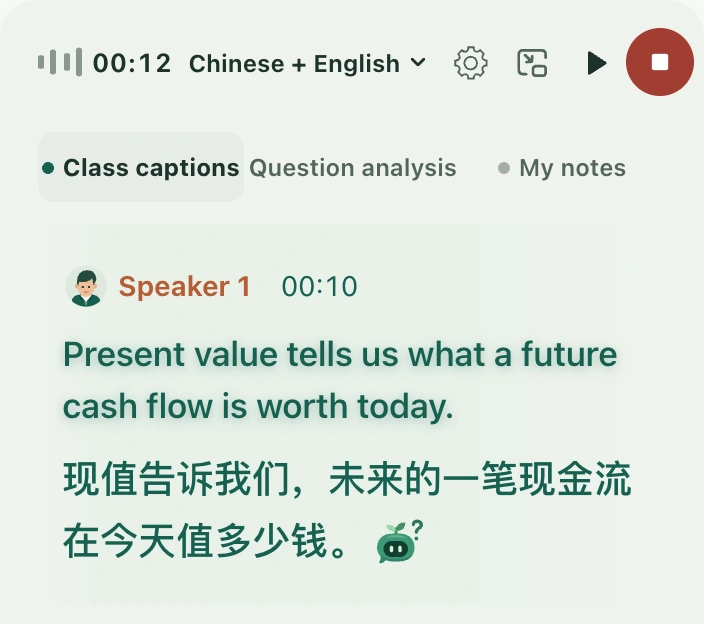
If you miss a sentence, you do not need to copy out the whole caption. The Sylli question icon at the end of a caption includes those original words. If the teacher asked a question, AI attempts to answer and explain it; otherwise, it helps explain the statement. This manual action works independently of teacher question detection and does not alter the original caption.
Select Ask AI at the end of a caption to read an explanation of the original words.
Before you begin
Sign in, open your own class, and check that Class captions has readable content. You can use it during a class or while reviewing a saved class. Choose original text and translations that have settled. A changing segment without readable original text may not offer the action. Demo captions help you find the control; real questions in your own class require sign-in.
Ask from a caption
Open Class captions on the right and find the passage you did not understand. Check key terms in the original and translation before treating an obvious transcription error as the teacher’s conclusion.
Move the pointer to the end of the caption, or use Tab to focus its Sylli icon. Its tooltip is Ask AI, and its accessible name explains that it answers or explains this caption.
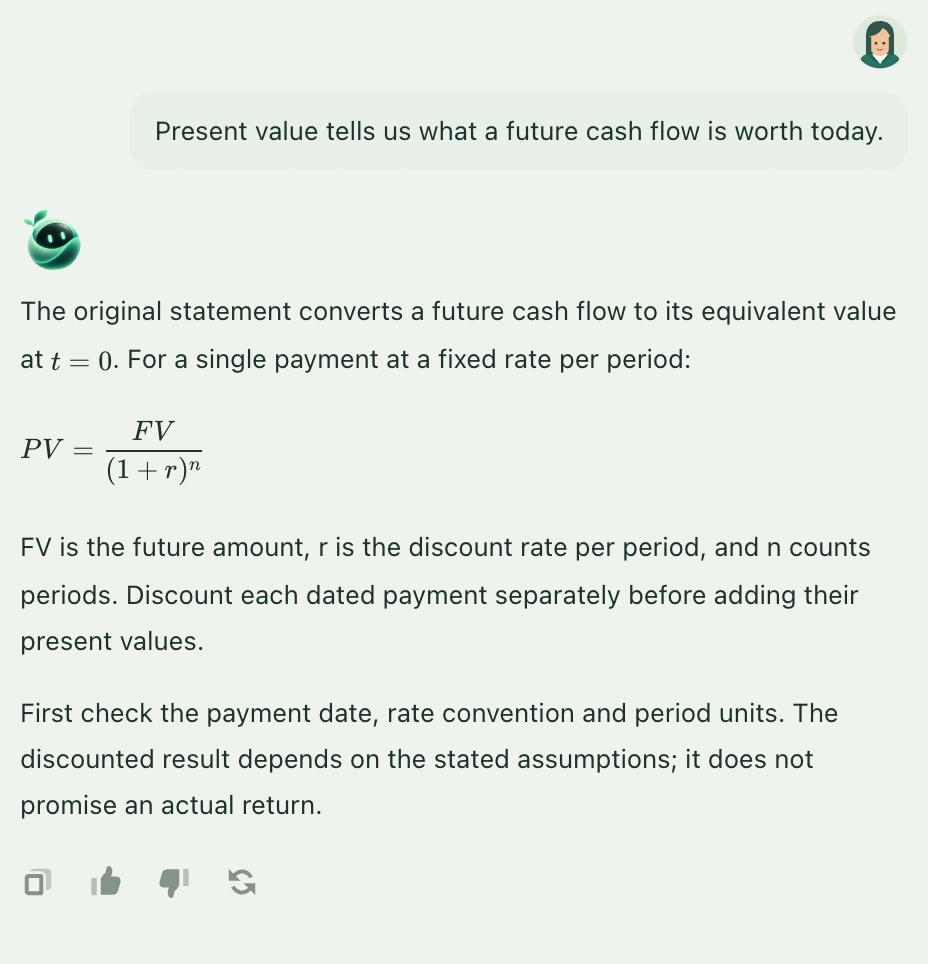
Select the icon. The request goes directly to AI Q&A in the current class and quotes the caption as it was when you selected it. No second send is needed.
Read whether the response answers the teacher’s question or explains a statement. If there is insufficient information, add nearby sentences or conditions from your courseware rather than asking AI to guess.
For a term you still do not understand, return to Ask a question and write a specific follow-up, such as “What does … mean in your explanation?”
Marker 1 points to the Sylli question action at the end of a caption.The explanation and quoted original words appear in the same class conversation.
What if there is no Ask AI icon after the caption?
Wait for the caption to settle. Check whether you only see provisional translated text or the segment is still loading. You can also copy the key original words into the AI composer manually.
What if the caption is too long?
Take the most important sentence or a few sentences and enter your question manually. You do not need to explain an entire long passage at once.
What if the answer does not match the teacher’s meaning?
Check the original, then add the preceding or following sentence or correct the term. AI explanations cannot replace original classroom evidence.
What if the caption explanation is unfinished?
Use the retry action beside the answer. After changing class, start again from that class’s own captions.
Syllink · Your AI classroom companion
More than a lecture. A lesson you keep.
Follow the ideas in class and keep learning afterwards. Keep explanations, materials, notes and key points together as a starting point for your next review.